Guides
Part of Apartment EV charger work orders: how to log a request without diagnosing it
Apartment EV charger provider scope: request guide
An apartment EV charger provider scope defines the service request, records the packet and access limits, and separates provider findings from approval.
An apartment EV charger provider scope is the written boundary around one requested service event. It tells the provider what the property observed, what information accompanies the request, and what answer or action the property needs. It does not ask staff to make a technical diagnosis before the right party has reviewed the equipment.
What to take away
- Write the request as an observable event and a defined question.
- Separate the requested service from any later provider recommendation.
- Record the documents supplied, response received, and limits of the assignment.
- Keep unanswered questions visible instead of treating an assignment as a completed repair.
Start with a bounded request
A useful scope begins with the smallest accurate description: asset or port identifier, location, reported time, reporting source, and observed condition. Then state the requested result. For example: "Review the reported charging-session failure and advise on the next supported step." That is clearer than "fix the charger," which could mean several different things to different people.
Charger-specific fields to capture
Use a work order or service ticket to record the request. Capture the following when available, marking unknown items for follow-up rather than guessing:
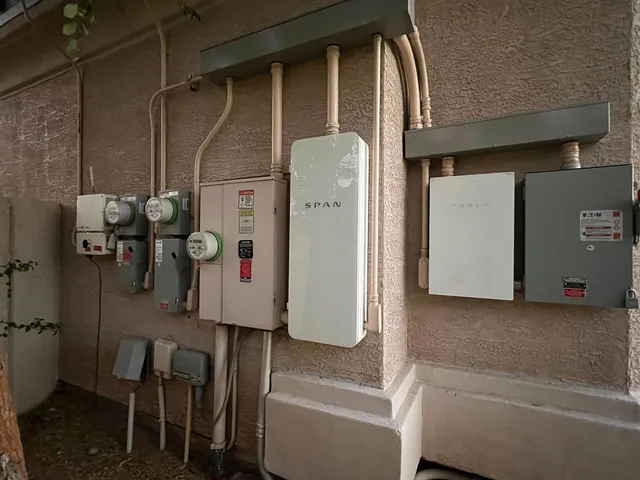
- Equipment and network:manufacturer, model, serial number, station and port identifiers, connector type, network operator, and firmware version. Record the Open Charge Point Protocol (OCPP) version if the charger uses OCPP and the information is available.
- Reported issue:observed condition, date and time reported, reporting source, relevant error or session reference, and dated screenshots or session records. Keep resident details to what the service route needs.
- Electrical and installation records:panel and circuit references, any existing load calculation and who prepared it, and the related drawing or work-order reference. Include the utility account or service reference only if it is needed for the request.
- Permit and code records:permit reference, permitting authority, and applicable code as recorded in the installation file, if relevant. Do not infer compliance or make a technical diagnosis from these records.
- Warranty:documented coverage terms and dates, who holds the warranty, and whether the provider should confirm coverage for this request.
- Access:onsite contact or role, approved access window, who releases keys or gate access, and how restricted system access will be arranged. Do not put passwords or gate codes in an ordinary work-order packet.
- Assignment and payment:provider or network operator name, requested result, whether the request is for review, a visit, a record check, or a quote, and whether work is authorized. Ask for any diagnostic or service-call fee in writing and record who approves and pays before authorizing chargeable work.
Example service-ticket entry
This illustrative entry shows how to mark unknowns without treating them as findings:
- Asset and location:property-labeled charger at the east garage wall; make, model, and serial number to be read from the equipment label at the visit; network operator name to be copied from the charger app if the label is unreadable.
- Reported condition:charging session reportedly ends before charging is complete; report and dated screenshot attached, if available.
- Electrical and installation records:panel, circuit, and load-calculation references not confirmed; property to attach existing records if located. Charger circuit identified as vehicle charging equipment under NEC (NFPA 70) Article 625, with the ampere rating still to be verified.
- Warranty and permit records:warranty holder and coverage to be confirmed from the property file; permit number and issuing office not confirmed at intake.
- Access:property manager to coordinate the visit and release keys; any restricted credentials to be handled through the approved secure process, not included in the ticket.
- Requested result and limits:remote review of the report and session record, followed by findings and a written quote that identifies any diagnostic or service-call fee and names the party expected to pay, whether owner, association, resident, or network operator. No onsite work or repair is authorized until the property records approval and payer.
Bounded Request Checklist
- Asset or port identifier
- Location of charger
- Reported time of event
- Reporting source
- Observed condition
- Requested result stated
- Boundarywork not authorized
The scope should also name what is outside the request. A property may be asking for remote review, an on-site visit, warranty guidance, or a quotation. Those are different assignments. Recording the boundary protects both the property and the provider from assuming that a request authorizes work that has not been discussed.
Build a source packet
The provider should receive the materials needed to understand the request, not a long thread with unclear status. A small packet can include the original report, asset label, dated screenshots if available, prior work-order reference, and a contact for access questions. Do not add private resident details unless they are genuinely necessary for the service route.
For an apartment or condo, include available operation and maintenance manuals, warranties, and record drawings when they relate to the request. Note each document's source and whether it is available, rather than treating the packet as a complete repair history.
| Scope field | What to record |
|---|---|
| Requested service | Review, visit, quotation, or record check |
| Known facts | Time, location, asset reference, and report source |
| Included materials | Each file or prior record supplied |
| Boundary | Work not yet authorized or information not available |
| Expected response | Next step, findings, quote, or access request |
Record the provider response separately
A provider's reply may add new possibilities or recommend another action. Keep that response in its own field. It is a provider statement, not proof that the property has approved a repair, a price, or an operational change. If a decision is made afterward, record who made it and what source they used.
Keep open questions open
Before moving a scope to closeout, check whether the provider's requested response arrived and whether any follow-up needs a new work order. A clear "awaiting provider response" label is more useful than a closed record with an unresolved question hidden in notes.
Define the request without diagnosing the equipment
Describe the reported event, asset reference, location, time, source, and service question. Do not direct an unqualified reader to change equipment, access a system, or decide the cause. The scope tells the provider what record to review and what response the property needs.
Define the request
| Requested result | Scope record |
|---|---|
| Remote review | Report, location, asset reference, and stated question |
| On-site visit | Access boundary, contact route, and observed condition |
| Quote | Defined service question and known scope limit |
| Record check | Named document set and unanswered item |
Use the property's charger label or precise location to help the provider match the request to the correct station or port. Include a stable asset reference when available.
Keep sensitive records restricted
Share only resident information needed for the charger service request. Keep payment information, passwords, and access credentials out of the ordinary provider packet; use the property's approved system and a controlled reference when restricted information is required.
Preserve the work-order trail
Retain the original request, packet list, provider response, and later decision as separate dated records. The property file should make clear what was requested, what materials were sent, and what the provider reported. Follow the property's process so a later reviewer can distinguish a request from a provider finding or approved action.
Before closing the request, record whether the provider supplied the stated response and whether a new work order or decision is still needed. This keeps a limited scope from appearing as a completed repair.
Common questions
These are the questions property staff raise most often when they write a scope.
Is a provider scope the same as approval to perform work?
No. It documents the request and its limits. Approval, pricing, or authorization should be recorded separately when applicable.
What if the provider needs more information?
Add the question, requested material, and the date to the work-order record. Do not replace the original request.
Should a scope include a diagnosis?
Only if a qualified provider has supplied one and the record identifies it as their statement. Intake staff can stay with observed facts.